Every Entry Has a Name on It: The Staff Audit Trail
The evening count is 1,400 taka short. Two people were on the counter today. Somewhere in the day, one of them voided a due collection “by mistake” and entered a smaller one in its place. You don’t know which one, and you don’t know whether it really was a mistake. So you do what every owner does: ask both, believe one, and absorb the loss.
Why the question has no answer today
Ask most pharmacy software who did something and the best it can do is an “entered by” column on an invoice. That covers the sale. It says nothing about the moments that actually move money after the fact:
- a due collection voided and keyed in again for less,
- a discount edited in the afternoon and put back before closing,
- an expense deleted, or entered today but dated last week.
The khata has even less. A line struck through in pen has no name next to it. So the conversation at closing time starts from suspicion, and it usually ends with whoever sounds more sure.
Every entry has a name on it
MediPharma24 keeps a staff audit trail: the shop’s record of who entered and who changed its business records. It covers sales, purchases, sales and purchase returns, due collections, customer refunds, supplier payments, stock adjusts, discounts, expenses, incomes and journal vouchers. Every act on one of them leaves a row with who did it, when, in which shop, and to which record:
- Entered: the record and its amount.
- Edited: each field that changed, with what it was before and what it is after. “Electricity → Generator fuel”, “500 → 750”, in plain words.
- Voided: a due collection, customer refund or supplier payment, with the reason the person typed and the amount.
- Deleted: a copy of the record as it was when it was deleted.
- Reversed: a journal voucher, under its own number.
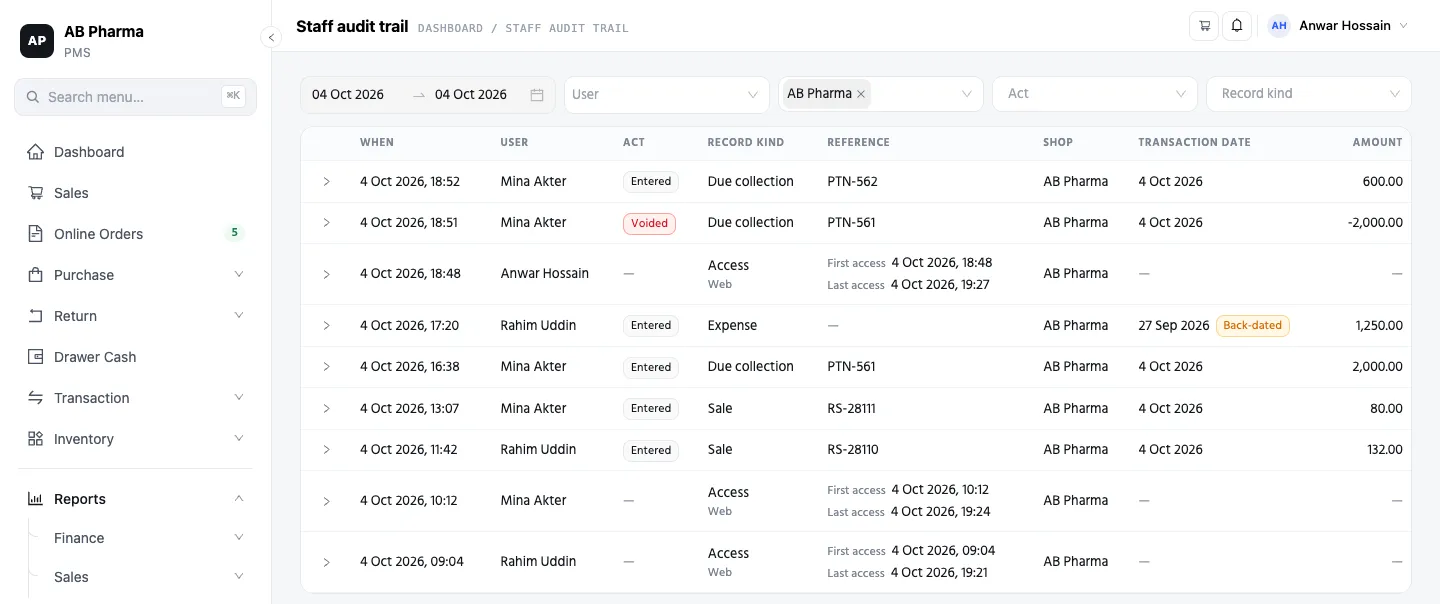 One day, one shop. Each row says when, who, what they did and to which
record, and a row opens to show the detail: the reason for a void, or the
before and after of an edit.
One day, one shop. Each row says when, who, what they did and to which
record, and a row opens to show the detail: the reason for a void, or the
before and after of an edit.
No one in the shop can edit or delete a row of the trail. It is only ever added to.
Back to the 1,400
Open Reports → Summary → Staff audit trail, pick Today, and the day is laid out newest first. The due collection is there twice: entered once, then voided, with the reason that was typed at the moment it happened, and the smaller one entered after it. Each row has a name and a time on it.
Maybe the reason holds up. The customer really did pay less, and the first figure was a slip. Then the record says so, and nobody had to be accused of anything. Maybe it doesn’t hold up. Either way, the conversation starts from what happened, not from who you believe.
Back-dated, and you can see it
An expense keyed in today but dated last week doesn’t hide in last week. It shows up today, the day it was entered, marked Back-dated, with the date it was given next to it. The same goes for anything entered with a date more than a day away from the day it was keyed in: an income, a journal voucher, a supplier payment. Voiding last week’s payment today is not back-dating; that row simply says voided, today.
When each person’s day began
Next to what people did, the trail shows each person’s first access and last access of the day in each shop: when the app first heard from them that day, and when it last did. Each row also says how the request came in: the web app, the mobile app, or an AI connection, along with the address and the device.
So “was this void made at the shop PC or from a phone?” has an answer.
A shop that trades past midnight can move the hour that day starts (Day starts at, 06:00 unless you change it), so a late night’s first and last access stay on the day it began.
Every branch, one screen
With more than one shop, the trail opens across every shop you can reach, and you narrow it down from there: by person, shop, act, record kind and date range. The filters are part of the page’s address, so a narrowed view can be bookmarked or shared. From the Users list, the Trail icon on any row opens the trail for that person straight away.
A manager you give the trail to sees only the shops they can open in the app. A discount that covers three shops leaves an entry in each, and a manager reading one shop sees that shop’s entry, not the others’.
Through an AI connection, still under a name
If your shop uses an AI connection, an expense or an income recorded through it lands in the trail under the person’s name, with the AI connection named next to it. The entry doesn’t lose its name because it came in through an AI client.
What it records, and what it doesn’t
The trail records acts and access. It doesn’t record which pages someone opened, what they searched for, or how long they sat idle. It doesn’t know when anyone left, or who was standing at the counter. It’s a record of the work, not a watch on the person.
That matters for the honest staffer as much as for you. When a figure goes missing, the person who did nothing wrong is cleared by the same record: their name isn’t on the void. A dispute ends with a fact, not an accusation. That’s why it’s worth telling your team the trail exists. A record everyone knows about keeps everyone careful, you included.
One honest limit: the trail starts on the day your shop got it. It can’t go back and work out who did what before that.
Who can read it
The trail sits behind its own permission, Staff audit trail. Owners’ roles have it from the start. A manager gets it only if you give it to their role in the role editor, and you can take it back the same way. Without it, a staff member can’t read any of the trail, including their own rows.
Who can see what was about access before the act: each person gets the key their job needs and no more. This is the record after the act: whatever each person did with that key has their name on it.
Tonight, before the drawer is counted, open the trail and pick Today.
This is part of a series for pharmacy owners: Who can see what · Counting the drawer · Where cash leaks in a pharmacy · the full tour.