The Best Pharmacy Software in Bangladesh: A Buyer's Guide
*Search Google for “best pharmacy software in Bangladesh” and you’ll find plenty of lists. But many of those lists are written by the software companies themselves. This guide takes a different approach: instead of telling you which software is “the best,” we’ll show you how to evaluate any pharmacy software yourself—including what features actually matter, what it should cost, what questions to ask, and which warning signs should make you walk away.
And yes, you can use the same checklist to evaluate MediPharma24.*
Buying pharmacy software is not like buying a printer.
Your daily sales, inventory, purchases, customer dues, supplier payments, and accounting will eventually depend on it. And if you switch systems later, migrating years of business data can be painful.
So spending one hour evaluating software before you buy can save you months of headaches later.
Here’s how to evaluate it.
Why a Pharmacy Can’t Run on Just Any POS Software
A standard POS can print an invoice. But pharmacies have problems that ordinary retail stores don’t.
- Medicines expire. You need to track inventory by batch and expiry date, not just by quantity.
- The same medicine comes in different forms. Your catalog needs to understand brands, generics, strengths, and dosage forms—not just simple product names.
- Credit is part of the business. Customers may buy on credit, while you may also purchase medicines on credit from suppliers. Your software should track both sides of the ledger.
- Payments are local and diverse. Cash, cards, bKash, Nagad, Rocket, and bank payments all need proper tracking and reconciliation.
- Your counter staff aren’t accountants. The sales screen should be fast and simple, while the accounting behind it should happen automatically.
If software treats these as “extra features,” it is essentially a generic retail POS with a pharmacy label—not a system designed around how a pharmacy actually operates.
The 8-Point Pharmacy Software Checklist
Put every software—including MediPharma24—through these eight tests.
And don’t settle for a feature list or brochure.
Ask for a live demo and make them show you.
1. How Fast Is Billing at the Counter?
A slow checkout can mean lost sales when the pharmacy gets busy.
Check whether:
- One bill can be paid part cash, part bKash, with the rest left as the customer’s baki — in a single checkout
- Products can be searched by brand and generic name
- Different strengths and dosage forms are easy to distinguish
- A 10-item invoice can be created quickly
- It comes with a preloaded medicine database of Bangladeshi brands and generics, so you aren’t typing thousands of products by hand on day one — and someone keeps it updated as new brands launch
- Search can be limited to the products you actually stock, so a small shop isn’t scrolling past thousands of medicines it never carries
During the demo, ask the salesperson to let you create a 10-item invoice. Don’t judge speed by watching someone who already knows the system.
2. Does It Track Inventory by Batch and Expiry?
“500 Napa tablets in stock” isn’t enough.
You should be able to answer:
Which batch → how much stock → when purchased → when does it expire?
A good pharmacy system should warn you before medicines expire, giving you time to return stock to suppliers or plan sales.
And when stock eventually expires, the financial loss should be visible in your records. Otherwise, inventory losses simply disappear into the numbers.
Then check boxes and pieces — how stock comes in and how it goes out. You might buy Napa by the full box from the company, or pick up 300 loose tablets from a 500-tablet box at a wholesale pharmacy. But customers always buy in pieces — two tablets, or ten when they ask for a strip. The software should let you enter a purchase in boxes or in loose pieces, sell in pieces, and keep the stock count right either way. If the demo can only buy and sell whole boxes, your stock count will be wrong by the end of the first week.
3. Does It Handle Purchases and Supplier Payables?
A Purchase Entry screen alone isn’t enough.
Check whether the system can:
- Record purchase invoices
- Add stock from purchase invoices
- Track each supplier’s running balance
- Record supplier payments and outstanding dues
- Properly account for Purchase Returns
Then ask one more question:
Can the software read a supplier’s paper invoice automatically?
For example, MediPharma24 uses AI to read an invoice image, identify the products, and match them with your product catalog.
4. Can It Keep Customer Credit Under Control?
Credit may be normal in pharmacy business. Losing track of that credit is not.
At minimum, the system should provide:
- Customer-wise outstanding balance
- Complete transaction history
- Due collection records
- Payment receipts
- Outstanding reports
A simple “Due” number isn’t enough. You should be able to understand exactly how that balance was created and how payments changed it.
5. Does It Have Real Accounting?
This is one of the most important questions.
A Sales Report is not the same thing as a Profit & Loss statement.
Ask directly:
“Can I generate a Profit & Loss statement and Balance Sheet for any period directly from the software?”
If the answer is:
“Export it to Excel and give it to your accountant,”
or
“Our accountant can use these reports,”
then the actual accounting is still outside the software.
A proper system should automatically turn sales, purchases, payments, receivables, payables, and other financial transactions into accounting records.
6. Does It Have Reports That Help the Owner Make Decisions?
Software shouldn’t just store data. It should help you understand your business.
Useful reports include:
- Daily and monthly sales
- Product-level profitability
- Slow-moving products
- Low-stock items
- Upcoming expiry
- Cash position
- Customer receivables
- Supplier payables
- Profit & Loss
You shouldn’t have to open Excel every week just to understand whether the business is doing well.
7. How Granular Are User Roles and Permissions?
Your counter staff should be able to sell medicines—but they don’t necessarily need access to everything.
For example, a salesperson might be allowed to:
- Create sales
- Apply limited discounts
But not:
- See purchase prices
- View profit margins
- Delete invoices
- Change important settings
- Access financial reports
Don’t just ask:
“Does it have user roles?”
Ask:
“How precisely can I control what each user can see and do?”
8. Can It Grow With Your Business?
You may have one shop today and two or ten shops later.
If expansion is part of your plan, check whether the system supports:
- Multiple shops under one account
- Separate inventory for each shop
- Shop-wise sales and profitability
- Shop-specific user access
- Centralized management across branches
Changing software after opening multiple branches can be much more painful than choosing the right architecture from day one.
Offline Desktop or Cloud?
This choice matters more than most feature lists.
Offline desktop software keeps working when the internet goes down. But your data lives on one computer. If that PC crashes, gets a virus or is stolen, your stock, dues and sales history may go with it — unless someone takes backups, every day, without fail. Some desktop systems add “offline-online sync” to cover this; ask exactly how often it syncs and what happens when two counters sell the same stock while offline.
Cloud software needs an internet connection at the counter. In return, your data lives on a server rather than the shop PC: a dead computer loses nothing, backups aren’t your job, and you can check sales and stock from your phone.
For most shops in Dhaka and other cities, a mobile-data hotspot is a cheap fallback for broadband cuts. If your area loses both power and mobile data for hours at a time, weigh offline software more heavily.
Ask either kind of vendor:
“If my computer dies tonight, what do I still have tomorrow morning?”
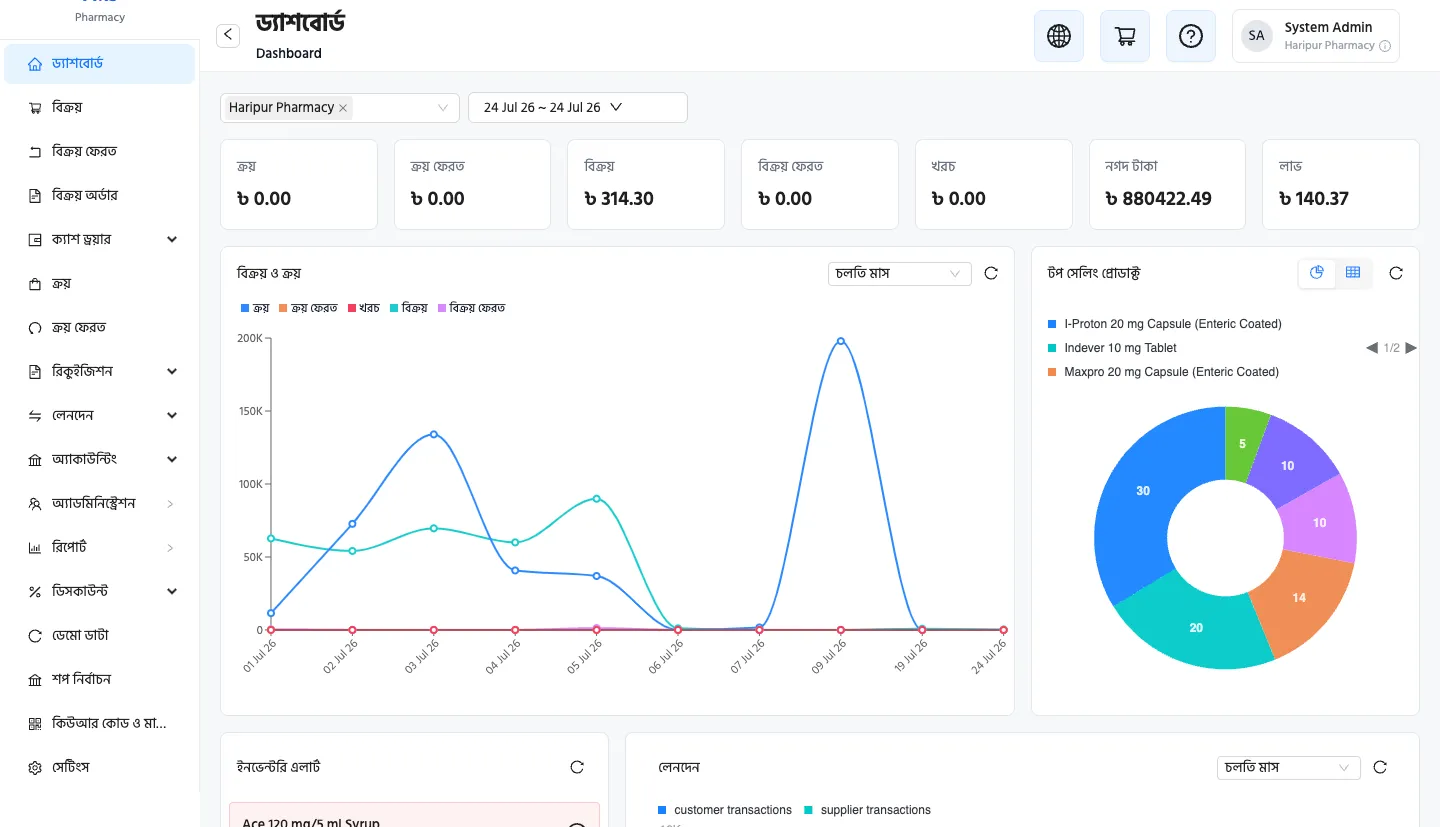
With the right pharmacy software, sales, cash, receivables, payables, low stock, and expiry information can be managed from one place—whether you run one pharmacy or an entire chain.
How Much Does Pharmacy Software Cost in Bangladesh?
The market generally falls into three pricing models.
One-Time License
Typically around ৳5,000–৳50,000+, depending on the version and how many computers it runs on.
It may look cheaper initially, but ask:
- How much do updates cost?
- What happens if you need another computer?
- Is technical support included?
- Who handles backups?
- Do new features cost extra?
Monthly Subscription
Typically around ৳500–৳3,000 per shop per month, depending on the features and service level.
Cloud-based systems commonly use this model, with software updates, infrastructure, and support included in the subscription.
“Free” Software
Free doesn’t always mean zero cost.
The real cost may come through:
- Advertisements
- Missing features
- Paid add-ons
- Limited support
- Data export restrictions
- Abandoned software
- The cost of moving to another system later
So don’t compare software based only on the monthly price.
Ask for the total first-year cost in writing:
License + Setup + Training + Data Migration + Support + Hardware
The software with the lowest sticker price isn’t necessarily the cheapest software to run.
A Worked Example: One Shop, Three Years
| One-time license | Subscription at ৳500/month | |
|---|---|---|
| Up front | ৳5,000–৳20,000 | ৳0 |
| Year 1 | License + any setup fee | ৳6,000 |
| Years 2–3 | Paid updates, a new PC install, backup and repair visits — ask for each in writing | ৳12,000 |
| If the computer dies | Data depends on your last backup | Nothing lost |
A ৳10,000 license is not automatically cheaper than a subscription. A cheap subscription isn’t automatically better either. Add up the three years for your own shop, with the vendor’s real numbers.
5 Warning Signs to Watch For
1. No Live Demo
If you can’t actually try the software before paying, stop and think.
2. Your Data Is Held Hostage
Ask:
“If I leave your software in the future, can I export my products, customers, sales, and transaction history?”
If the answer is no, that’s a serious warning sign.
Your business data should belong to your business.
3. No Batch or Expiry Tracking
For a pharmacy, batch and expiry tracking aren’t optional extras. They are fundamental inventory requirements.
4. “Accounting” Means Just Sales Reports
If the system calls a collection of sales, purchase, and due reports “accounting,” look deeper.
Ask specifically about:
- Profit & Loss
- Balance Sheet
- General Ledger
- Accounts Receivable
- Accounts Payable
5. No Local Support
When your counter stops working during a busy evening, an overseas email address may not be enough.
Look for responsive local support through phone, WhatsApp, or other channels—and preferably support in Bengali.
So, Where Does MediPharma24 Stand?
MediPharma24 was built around a simple observation:
Pharmacies don’t just need billing software. They need a system that connects sales, inventory, purchasing, receivables, payables, and accounting.
Against the checklist above, MediPharma24 provides:
- Fast POS billing in Bengali and English
- Batch- and expiry-based inventory
- Buy in boxes or loose pieces, sell in pieces
- Over 28,000 Bangladeshi medicines preloaded with the updated MRP — brands, generics, strengths and pack sizes — plus surgical items, cosmetics and health commodities
- My Catalogue: search shows the products your shop deals in first
- AI-powered supplier invoice capture
- Customer receivables and supplier payables
- Built-in double-entry accounting
- One-click Profit & Loss and Balance Sheet
- 40+ business reports
- 90+ granular permissions
- Multiple shops under a single account, with a single pharmacy as the starting point
To be upfront about one trade-off: MediPharma24 is cloud software and needs an internet connection — it has no offline mode. In return, your records live on our servers, not the shop PC, and the owner’s mobile app shows sales, stock and dues from anywhere.
The pricing is straightforward:
৳500 per shop per month.
Guided setup and data migration are included, and under the current Early Bird offer, the first 6 months are completely free. For one shop, the first year costs ৳3,000 in total.
But don’t take our word for it.
That’s the whole point of this guide.
Ask us the same eight questions you’d ask every other pharmacy software provider.
Take a complete tour of MediPharma24 and book a free demo.
Ultimately, the best pharmacy software isn’t the one that calls itself “the best.”
It’s the one that handles your pharmacy’s real-world operations reliably, gives you control over your data and money, and continues to work as your business grows.
Part of our series for pharmacy owners: The complete MediPharma24 tour · Are You Actually Making Money? · Where Does the Money Leak Out of a Pharmacy?