Ask Your Pharmacy from ChatGPT or Claude
The shop closes at ten. By eleven you’re home, and the questions arrive on their own: what’s going to expire in the next two months? Who still owes baki? Did anyone enter the electricity bill? Until now the answer was a phone call to the counter, or opening the app and walking through the reports one screen at a time. Now you can just ask.
Eleven at night, one question
You already use ChatGPT or Claude on your phone. With an AI connection to MediPharma24, you type into it the way you’d ask your manager:
- You: What expires in the next two months?
- AI client:
Read from MediPharma24: expiring stock
4 batches, worth ৳12,705 at cost, expire before the end of November:
Product Batch Expires Qty Value at cost Insulin glargine 100 IU/ml IG2410 29 Nov 12 ৳8,640 Ceftriaxone 1 g injection CF2407 2 Nov 30 ৳3,540 Omeprazole 20 mg OM2408 18 Oct 60 ৳300 Cetirizine 10 mg CZ2405 15 Nov 90 ৳225 One batch has already expired: Salbutamol syrup, SB2402, 12 bottles worth ৳480 at cost. Take it off the shelf.
- You: And who still owes us?
- AI client:
Read from MediPharma24: customer balances
7 customers owe ৳18,450. The three largest:
- Karim Uddin — ৳6,200
- Nasrin Akter — ৳4,750
- Rafiq Hossain — ৳3,100
- You: Did anyone enter today’s electricity bill?
- AI client:
Read from MediPharma24: today’s expenses
Today has two expenses, tea for the counter (৳180) and a rickshaw fare (৳120). No electricity bill.
- You: Record it — a 1,200 taka electricity bill, paid from cash.
- AI client:
I’ll record this expense:
- Head: Electricity
- Amount: ৳1,200
- Paid from: Cash
- Date: today
Shall I record it?
- You: Yes.
- AI client:
Recorded in MediPharma24: an expense
Done. ৳1,200 for electricity, paid from cash. It’s in today’s expense list, tagged AI.
The answers don’t come from the AI’s guesswork. They come from your shop’s own records. And the last one is written into the books — not because the AI decided to, but because you asked, you confirmed, and your role allows it. Tomorrow morning it is in the expense list, tagged AI, with your name on it.
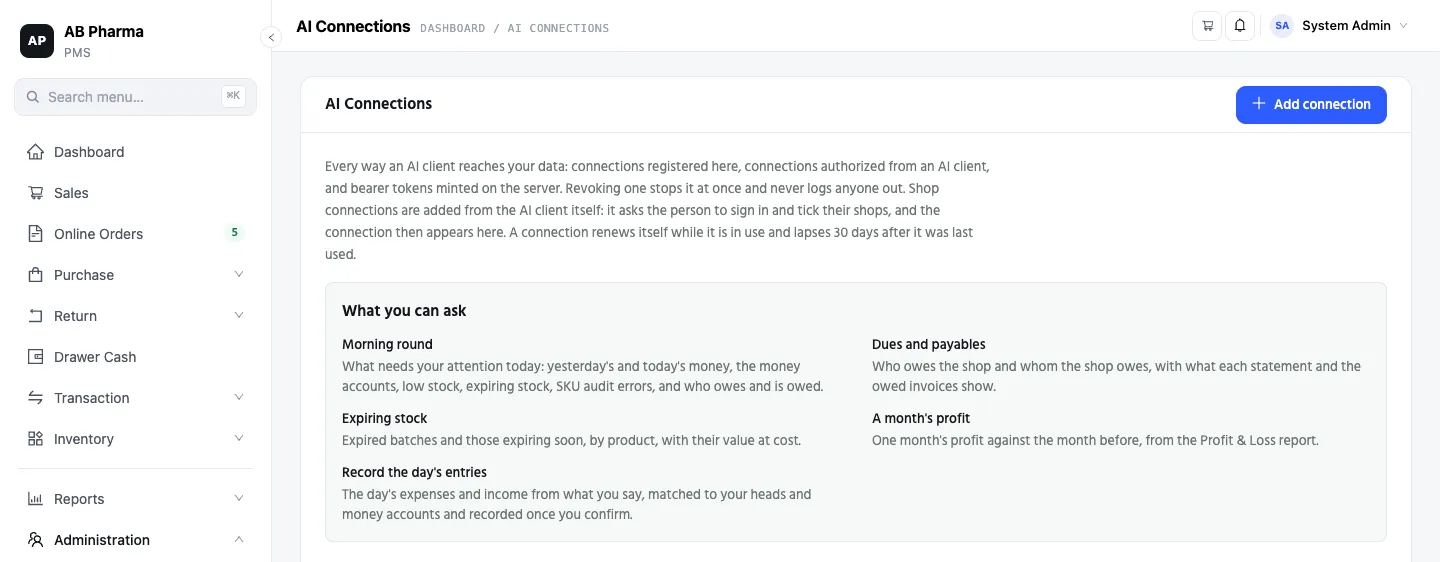
What you can ask
Your AI client can read what the app’s screens already show: sales totals and invoices, purchases, stock and low stock, expiring and expired stock, SKU audit findings, customer dues and supplier balances with their statements, the day book, an account head’s ledger, the Profit & Loss, and your money account balances.
To get you started, the connection comes with five topics — ready questions your AI client can pick up, listed under What you can ask:
- Morning round — what needs your attention today: yesterday’s and today’s money, the money accounts, low stock, expiring stock, SKU audit errors, and who owes and is owed.
- Dues and payables — who owes the shop, and whom the shop owes.
- Expiring stock — expired batches and those expiring soon, by product.
- A month’s profit — one month against the month before, from the Profit & Loss report.
- Record the day’s entries — the day’s expenses and income from what you say, recorded once you confirm.
Each topic appears only if your role can open the screens behind it.
What it can write — and what it never will
An AI connection can do exactly four things to your records:
- Record an expense.
- Record an income.
- Raise a requisition — never a purchase order. Turning it into an order stays a person’s job, in the app.
- Propose a product correction — it lands as a pending revision for review; the product itself doesn’t change.
If an expense or income looks like one already there — same head, same amount, same date — it is refused until you confirm. Same for a requisition when one for that product is already waiting.
It never makes a sale, a purchase, a payment, a return, a stock adjustment or a purchase order. The till stays at the till.
Connecting, once
In Claude (web, desktop or mobile) or ChatGPT, you add your shop server’s address. Then:
- A separate MediPharma24 sign-in opens.
- The Authorize screen names the connection, warns you that answers are sent to the AI platform, shows the topics your role can ask, and asks which of your shops to tick.
- You authorize. You — and your organization’s admins — get an email every time a connection is authorized.
That’s the setup. From then on, the connection is just there when you open your AI client.
Your data, your rules
Owners ask the right question first: what can it see? The honest answers:
Only the shops you ticked, only while you can still open them. Lose access to one of them and the connection ends. A new shop is never added without authorizing again.
One shop per answer. Every answer is one shop’s. There are no totals across branches — if you want both, ask twice.
The same permissions as the app. Every question is checked, every time, against the permission its screen needs in the app. If your salesperson’s role can’t open the Profit & Loss, their AI connection can’t read it either. A sale’s own cost never leaves; profit comes only from the Profit & Loss report, behind that report’s permission.
Everything leaves a trace. Every question counts as that person’s access to the shop in the access log. Every expense or income it records sits in the staff audit trail under the person’s name, with the connection named — and the expense list tags it AI.
Stop it any time. Revoke a connection on the AI Connections screen and it stops at once — without logging anyone out of the app. When an admin revokes someone’s connection, that person can’t reconnect until an admin allows it. And a connection nobody uses lapses on its own, 30 days after its last use.
What this does mean: the answers are shown by the AI platform, so the figures you ask about reach that platform. And anything the AI adds on its own — a forecast, an estimate, its own wording — is the AI talking, not your books.
You decide who on your team may connect
Not everyone gets an AI connection. Only a role you give the AI connection permission to can connect — and like every sensitive power in MediPharma24, it can only be granted by someone who already holds it. Maybe that’s just you. Maybe it’s you and your manager. It’s your call.
Honest limits, today
- It’s not in Try Demo. The demo pharmacy doesn’t carry AI connections, so you can’t try this one there.
- The staff audit trail can’t be asked about yet. What the AI records shows up in it; asking it “who edited what today” doesn’t work yet — open the screen for that.
- App links are for single-shop users for now. If you can reach exactly one shop, an answer can come with a link to the app screen it read. With more than one shop, it can’t yet.
Want it on your shop?
AI connections are live for MediPharma24 shops. Message us on WhatsApp or call, and we’ll get the AI connection permission onto your role.
The shop still needs you at the counter. The late-night questions don’t need you to get dressed and phone anyone.
This is part of a series for pharmacy owners: Your pharmacy in your pocket · Who can see what · Expiry is a silent thief.